ANNA
ANNA, the in-car assistant from Forza Horizon 3/4/5/6, brought to Forza Horizon 2 on PC (Azimuth)
I'm Not MentaL
- Approved by our team
- Verified creator: identity and work reviewed
- The file lives on github.com. You get a notice before downloading; we do not scan it.
- No pop-ups or fake download buttons on our site
Description
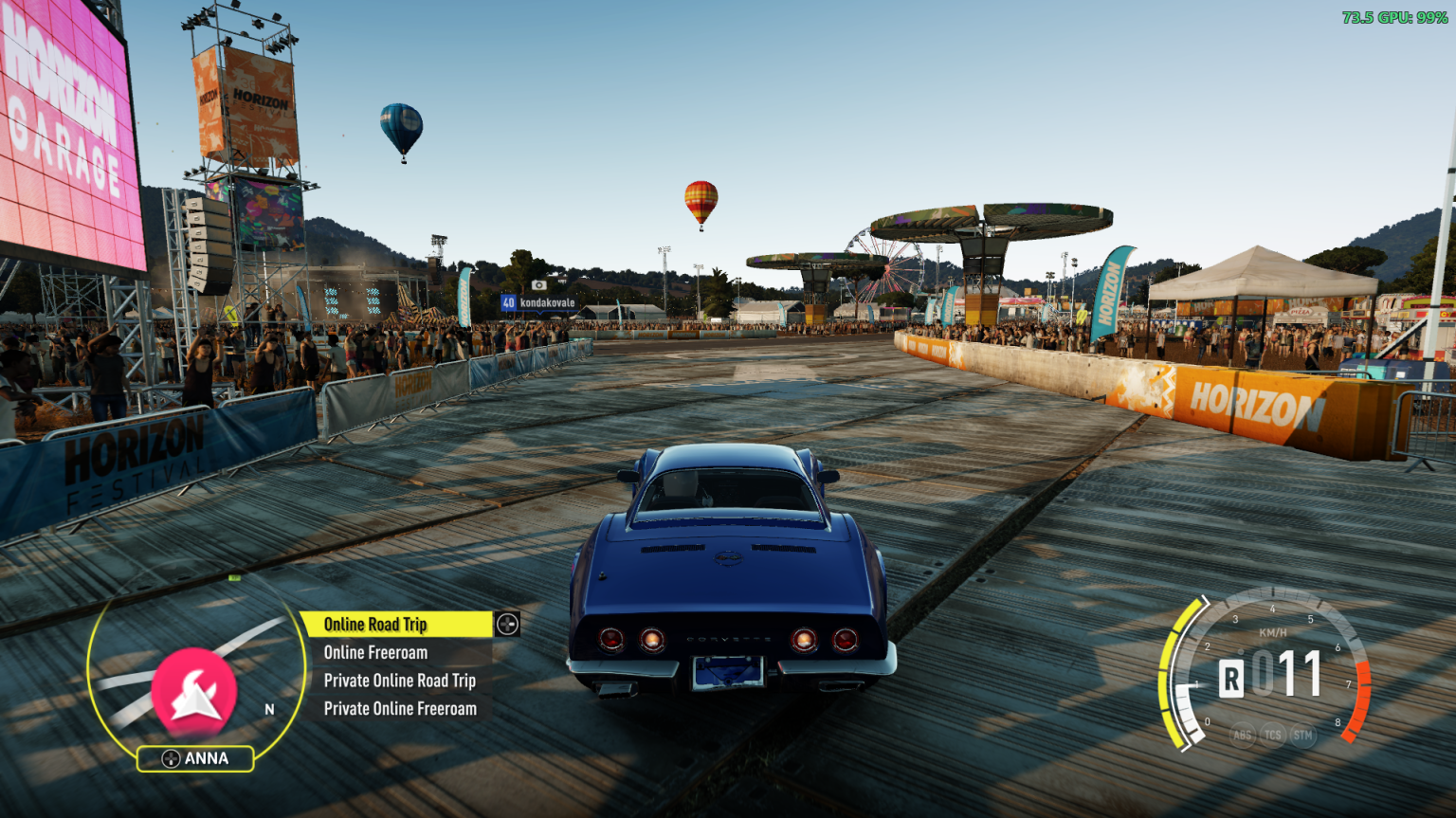
ANNA, the in-car assistant from Forza Horizon 3/4/5/6, brought to Forza Horizon 2 on PC (Azimuth). Forza Horizon 2 kept ANNA's HUD hidden away; FH2 ANNA turns it back on with Forza Horizon 3's look, round minimap, glowing edge and the list beside it, and fills it with things to do while you drive. Other mods can add their own entries to it.
What's in the menu
Car
- Enable Auto Drive: the car drives itself along your GPS route. Greyed out until a route is set. A few seconds in, the camera switches to slow cinematic shots and the HUD hides; touch the gas, brake or steering to take over. Works online too.
- Lights: headlights, hazard lights, left and right indicators. Headlights shine in daylight too, and pop-up headlights open and close with them.
- Doors: open or close all, the roof, hood, trunk, each door, storage compartments, pop-up headlights and active spoilers, whatever the car can move. The Lights and Doors lists stay open so you can flip things back and forth.
- Tune Car: opens the game's tuning screen, as the pause menu's Tune Car tile does (backing out of it leaves you on the pause menu).
Set Route To Nearest: Race, Bucket List, Festival, Barn Find or Bonus Board.
Start Matchmaking for: Online Road Trip, Online Freeroam, Private Online Road Trip or Private Online Freeroam, started straight from the road without opening the pause menu. Can be hidden on the Mods page.
Voice commands
Talk to ANNA like on the Xbox with Kinect. Turn on Voice commands on the Mods page, then while driving:
Say
- "ANNA" - Wakes up and listens: the ring round the minimap lights up
- "Set Route To Nearest": Opens that list
- "Race": Chooses it, shows it chosen, and does it
- "ANNA, Enable Auto Drive": Does it straight away
- "ANNA, set GPS to the nearest Bonus Boards": Also fine: list names, plurals and the usual ways of asking work
- "Back" / "Close": Goes back a list / puts ANNA to sleep
You can say anything the menu shows right now, as it reads now ("Close Hood" once the hood's open), and other mods' entries too. Once ANNA's awake, from "ANNA" or from D-pad down, you don't need to say "ANNA" again; it goes back to sleep after 10 seconds of quiet.
Voice commands use Windows' own speech recognition, offline, and your default microphone. A headset works much better than speakers. Windows only has speech recognition for some languages (English, French, German, Spanish, Japanese and Chinese); without one for the game's language, ANNA listens in English if Windows has that. If nothing happens, check Windows Settings > Privacy & security > Microphone > Let desktop apps access your microphone.
Languages
ANNA speaks the game's language: English, French, German, Italian, Spanish (Spain and Mexico), Brazilian Portuguese, Dutch, Polish, Russian, Japanese, Korean and Traditional Chinese, following the game's text language (or the one Extra Options sets). Names of places and modes are the game's own. Czech and Hungarian stay in English, as the game does. The Mods page rows follow from the next launch after a language change.
Installing
- Download the latest FH2ANNA-<version>.zip from Releases.
- Extract it into your Azimuth folder, the one with azimuth.exe in it. You should end up with DWrite.dll next to azimuth.exe, and FH2ANNA.dll in the fh2-mods folder.
IMPORTANT
FH2ANNA.dll goes in fh2-mods, not in Extra Options' mods folder. FH2 ANNA is a platform mod, not an Extra Options plugin: in mods it won't load properly.
- Start the game. ANNA's label sits under the minimap; tap D-pad down while driving.
The zip includes the FH2 Mod Platform (DWrite.dll). If you already have it from another mod, keep whichever is newer.
ANNA needs the minimap on in the game's HUD options. With the minimap off, ANNA's off too.
With other mods
Extra Options: FH2 ANNA has its own autodrive, indicators, hazards and headlights, so you don't need Extra Options' for those. Extra Options puts its autodrive on D-pad down and its hazard lights on D-pad up, which are ANNA's buttons, so turn those two off in FH2_ExtraOptions.ini (next to azimuth.exe), under [Bindings]:
AutodriveXbox=None
HazardsXbox=None
Otherwise opening ANNA also starts Extra Options' autodrive, and moving up ANNA's list switches the hazard lights. Extra Options' headlight key still works alongside ANNA's; whichever you used last wins.
FH2 Mouse & Keyboard: gives ANNA its keyboard keys and key pictures (see Controls).
Mods page text in other languages: the platform's Mods page shows mods' rows in Chinese, Japanese, Russian, accented letters and so on correctly while FH2 ANNA is installed.
Mod details
Compatible game version:Forza Horizon 2 Azimuth (PC port)
Promo video
Player screenshots
Sign in to add yoursNo screenshots yet. Be the first to share a shot from your game.