Nitro System
Fast & Furious style nitro for Forza Horizon 2 (Xbox One build on PC via the Azimuth launcher), built on the FH2 Mod Platform.
I'm Not MentaL
- Approved by our team
- Verified creator: identity and work reviewed
- The file lives on github.com. You get a notice before downloading; we do not scan it.
- No pop-ups or fake download buttons on our site
Description
Fast & Furious style nitro for Forza Horizon 2 (Xbox One build on PC via the Azimuth launcher), built on the FH2 Mod Platform.
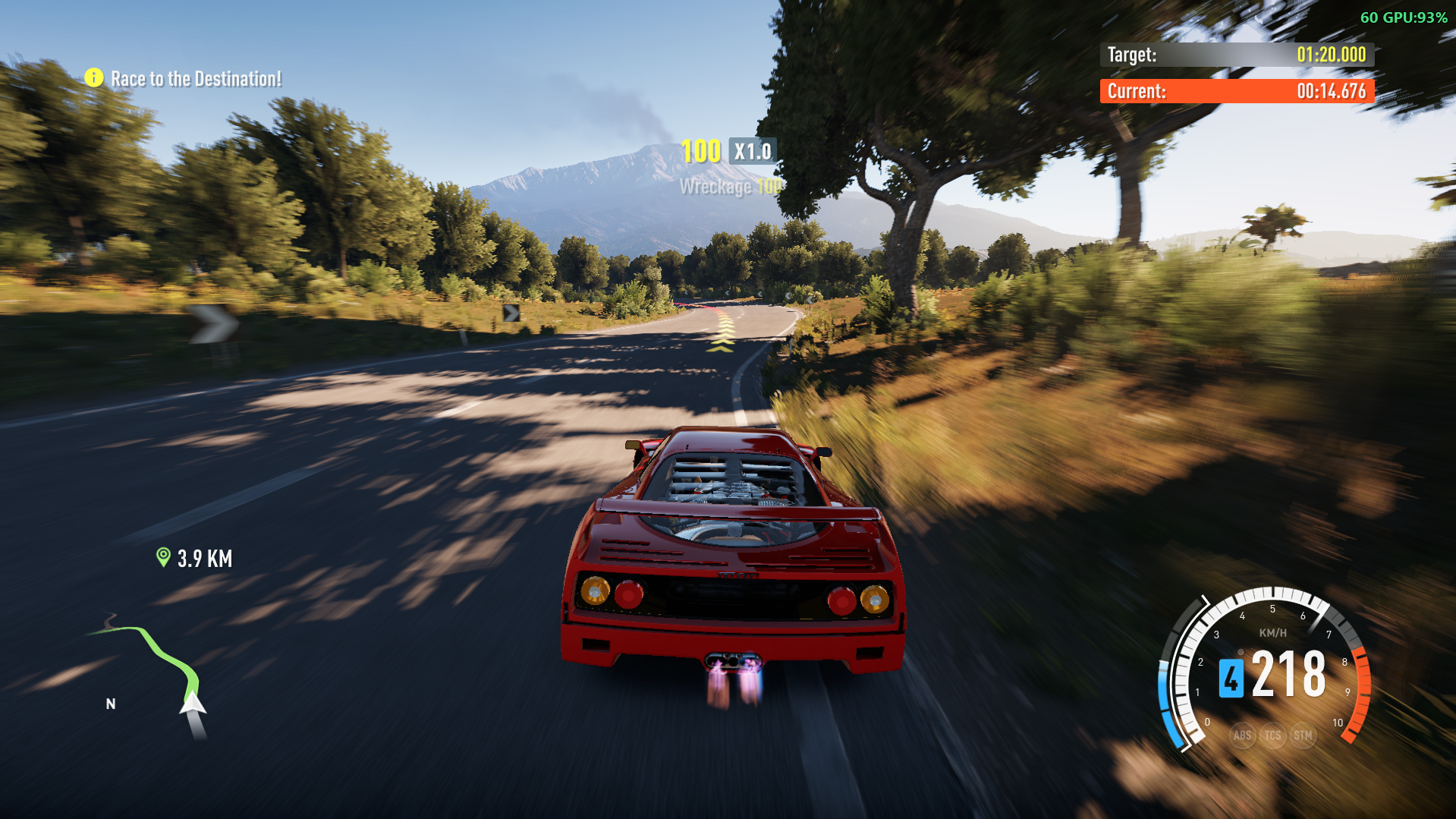
Hold LB (or any button you pick) to burn nitro: your car gets a strong push, blue flames shoot from your tailpipes, the speedometer gets a draining NOS gauge with a glowing tip, the nitro roars, the camera shakes and the controller rumbles.
Features- Nitro on LB, or any button you choose. Hold the left shoulder button on any connected controller, or remap it to another button, d-pad direction or trigger (see Nitro Button below). There is no keyboard key.- A real tank. Nitro drains while you hold the nitro button and recharges when you let go. Run it dry and it locks out until you release the button and have recharged about 2 seconds.- Buildup curve. The push ramps up over a short time instead of snapping on.Stays on the road. The push follows the horizontal direction of the car's nose, so a pitched-up nose doesn't launch you into the sky, and nothing is applied while the car is airborne (or for a moment after landing).- Only while driving. Nitro only works while the game is simulating your car and the speedometer HUD is running, so it stays off in the pause menu, the map and loading screens. The tank doesn't drain or recharge while the game is paused. (Garage and car meet lobbies should also stay off, since the speedometer isn't active there.)- NOS gauge on the speedometer. Both the analog and the digital speedometers get a four-segment NOS bar that drains as you use nitro, with a glowing tip that follows the leading edge of the fill.- Exhaust flames. Blue flames come out of your car's real tailpipes while nitro is held (the mod drives the game's own backfire effect). Which tailpipes your car has is learned from the game's own backfires, so flames start after the first backfire of a drive or after you switch cars, which normally takes a few seconds.- Sound, rumble and camera shake. A boost sound that kicks in and then holds for as long as the tank lasts, and a stop sound (built into the DLL; put your own nos_boost.wav and nos_stop.wav in an FnFNitro folder next to azimuth.exe to replace them; your own boost sound loops from its start), a rumble that ramps up with the boost, and a camera shake while it burns. Each has its own setting below.- In-game settings. Everything below is on Pause > Settings > MODS.
Requirements- Azimuth launcher with Forza Horizon 2.- The FH2 Mod Platform (DWrite.dll in the Azimuth folder; tested with platform 2.8.0). The other mods you may already have, such as ShowFPS or Achievements, use the same one.- Forza Horizon 2 Extra Options. The NOS speedometer gauge and its HUD textures, the blue flame effect and the "every car can backfire" database change are all delivered through its mediaoverride folder. Without it the nitro push, sound, camera shake and rumble still work, but those won't apply.
InstallationThe paths below are examples. Use your own Azimuth folder.
From a release (easiest)1. Download FnFNitro-<version>.zip from the Releases page and unzip it.2. Close the game. Copy the zip's azimuth-windows\ folder into your Azimuth folder (the one with azimuth.exe). Say yes to merging.3. Start the game through Azimuth.
The zip contains the mod (FnFNitro.dll, with the HUD files, flame effect and nitro sounds inside it), the FH2 Mod Platform (DWrite.dll, which loads mods; if you already have a newer one from another mod, keep yours), the licences, and an INSTALL.txt with these same steps.
> IMPORTANT> FnFNitro.dll goes in fh2-mods, the FH2 Mod Platform's folder. It is not an Extra Options mod: don't put it in Extra Options' mods folder, where it won't be loaded. If fh2-mods doesn't exist yet, the zip creates it.
Start the game through Azimuth. Open fh2-mods\platform.log and look for lines like loaded FnFNitro.dll, and later Player car located and Vertical axis learned, which mean the mod found your car.
UninstallingClose the game first. Don't remove anything else from mediaoverride: the Mods page screens, string tables, car zips and DefaultCache.bin there belong to the FH2 Mod Platform and your other mods, and DWrite.dll is the platform itself.
To switch the mod off without uninstalling it, open Pause > Settings > MODS and turn Nitro System off (or set NitroEnabled=0 in the ini).
1. Delete the mod (Azimuth folder)Delete these from azimuth-windows:- fh2-mods\FnFNitro.dll- fh2-mods\FnFNitro.ini (your saved settings)- the FnFNitro\ folder, if you made one to use your own sounds2. Start the game onceLaunch the game through Azimuth. The mod's HUD, flame and database files in Mount\mediaoverride are handed out by the FH2 Mod Platform, and it deletes them shortly after startup once no installed mod uses them: the NOS speedometer (UI\Controls\HUDSpeedometerControl.xaml and the textures under UI\textures\Anthem\HUD\Speedometer\, UI\textures\data_bound\Anthem\HUD\ and UI\textures\data_bound\SpireHUD\), the flame effect (Particles\Systems\Backfire.xml) and the "every car can backfire" database copy (stripped\gamedbRC.slt, which is only made again if another mod still changes the database). The speedometer, flames and car backfires are then back to stock. Open fh2-mods\platform.log: there should be no [NitroSystem] lines.
Mod details
Compatible game version:Forza Horizon 2 Azimuth (PC port)