Resize Garage
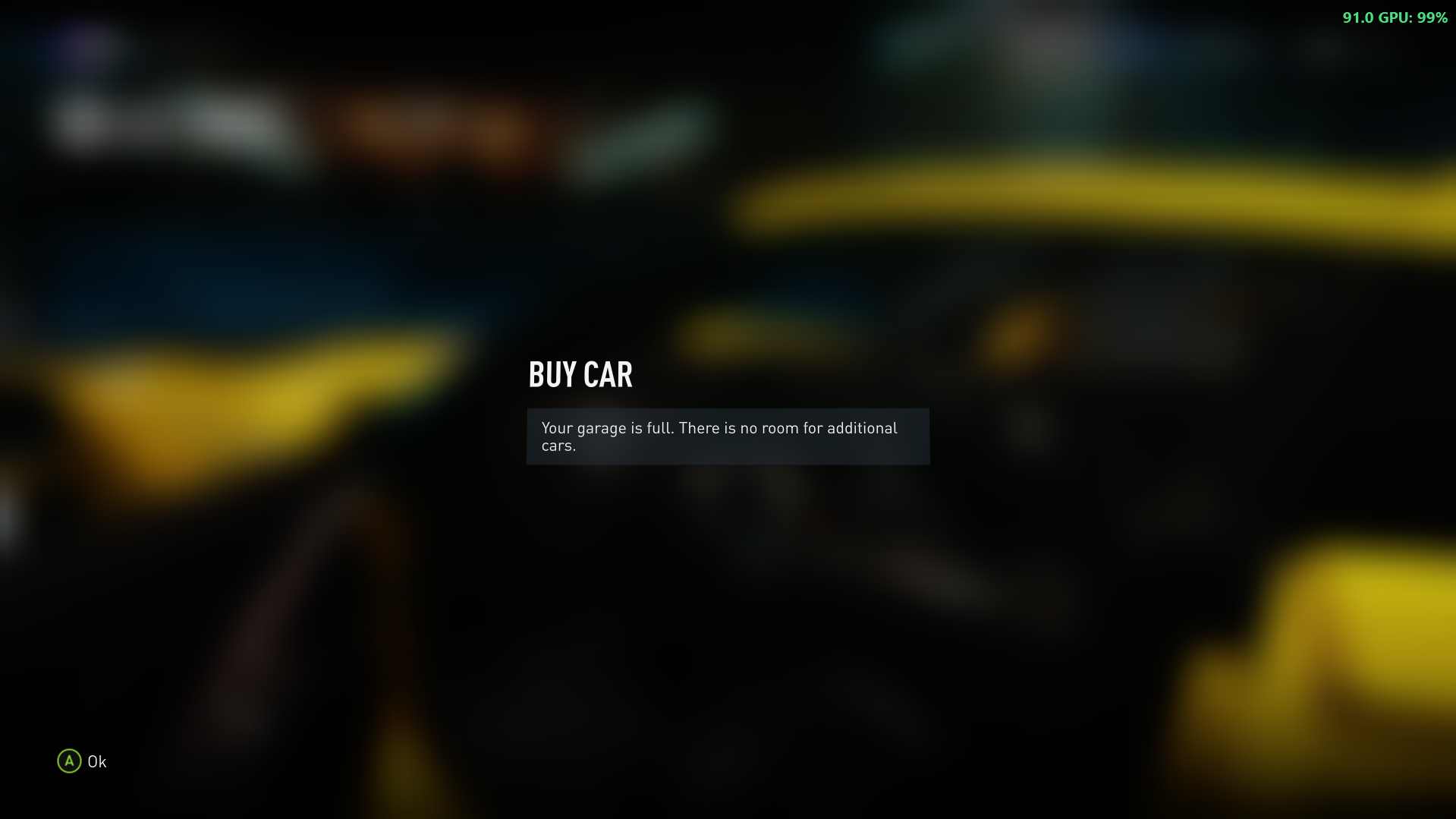
A small Forza Horizon 2 mod, written in VB.NET for FH2 Mod Platform for .NET. It raises the garage limit above the game's 550 cars, to 1000
I'm Not MentaL
- Approved by our team
- Verified creator: identity and work reviewed
- The file lives on github.com. You get a notice before downloading; we do not scan it.
- No pop-ups or fake download buttons on our site
Description
ResizeGarage

A small Forza Horizon 2 mod, written in VB.NET for FH2 Mod Platform for .NET. It raises the garage limit above the game's 550 cars, to 1000 by default.
Features
- Pick the garage size in game, under Pause > Settings > MODS: 550 (the game's own), 1000, 1500, 2000 or 3000 cars.
- Or set any size from 550 to 10000 in
fh2-mods\ResizeGarage.ini. - Raises the limit everywhere the game checks it: adding a car to the garage, the "garage is full" check, and the menus.
- Safe on other game builds: if the game's code isn't exactly what the mod expects, it changes nothing and the garage stays at 550.
- Update notices: the platform tells you in game when a newer release is out.
Requirements
- Forza Horizon 2 (Azimuth) with the FH2 Mod Platform (
DWrite.dll) installed. It comes in the FH2 Mod Platform for .NET zip. - Nothing else: ResizeGarage is a single native DLL, so it doesn't need the .NET runtime or Platform.NET.
Installing
Download ResizeGarage-<version>.zip from Releases and extract it into your Azimuth folder (the one with azimuth.exe). It installs fh2-mods\ResizeGarage.dll.
To remove the mod, delete fh2-mods\ResizeGarage.dll (and fh2-mods\ResizeGarage.ini if you don't want to keep your setting).
Usage
The garage holds 1000 cars as soon as the mod is installed. To change that:
-
In game: Pause > Settings > MODS > Garage size, then restart the game.
-
Or in the ini file: the first run creates
fh2-mods\ResizeGarage.ini. EditMaxCarsand restart the game:[ResizeGarage] MaxCars=1000
The size is read when the game starts, so a change takes effect after a restart.
Removing the mod later: if you have more than 550 cars, you keep every one of them. You just can't get new cars until you're back below 550.
Building from source
The project imports the SDK's MSBuild files from a sibling checkout, so clone both repos into the same folder:
GitHub\
├── FH2-ModPlatform.NET\     https://github.com/qiangqiang101/FH2-ModPlatform.NET
└── FH2_ResizeGarage\        this repo
You also need:
- The .NET 10 SDK (see global.json).
- The
FH2ModPlatformNuGet package (the version in ResizeGarage.vbproj). DownloadFH2ModPlatform.<version>.nupkgfrom the SDK's releases into a folder and add that folder as a source:dotnet nuget add source <folder> --name FH2ModPlatform. - Visual Studio's Desktop development with C++ workload (NativeAOT uses its linker).
Open ResizeGarage/ResizeGarage.slnx in Visual Studio and build the Aot configuration, or from the command line:
# bin/Release/net10.0/win-x64/publish/ResizeGarage.dll
dotnet publish ResizeGarage/ResizeGarage.vbproj -c Release -p:FH2ModHosting=Aot
The Debug and Release configurations make a hosted build (for fh2-mods-dotnet\, through Platform.NET), which is handy while developing because it can be reloaded without restarting the game. Releases are NativeAOT only.
To have builds copied straight into the game, set FH2ModsDir to your fh2-mods folder, for example in ResizeGarage.vbproj.user (not committed):
<Project>
  <PropertyGroup>
    <FH2ModsDir>D:\Games\FH2\azimuth-windows\fh2-mods</FH2ModsDir>
  </PropertyGroup>
</Project>
Releasing
.github/workflows/build.yml builds the NativeAOT zip when a release is published. You can also start a test build from the Actions tab (Run workflow); its zip is uploaded as an artifact. To release:
- Bump the version in
ModInfoin ResizeGarage.vb. - Publish a GitHub release tagged with that version (
1.0.1orv1.0.1). The workflow fails if they differ, because the in-game update check compares the two. - The workflow attaches
ResizeGarage-<version>.zipto the release.
License
MIT © 2026 Bartholomew Ho
Mod details
Player screenshots
Sign in to add yoursNo screenshots yet. Be the first to share a shot from your game.