Alehandro
Original author · not a ModsPoint member yet
This mod was listed by ModsPoint; no file is hosted here and the download goes to the author's own link. Are you the author? · · How we list mods
- Checked before it went live
- The file lives on www.farming-simulator.com. We do not scan it.
- No pop-ups or fake download buttons on our site
Description
Stop buying tractors you have never heard. Shop Sounds plays the real engine sound right in the shop: start the engine, rev it to full throttle, put it under load and compare vehicles back to back - before you spend a single euro.
ENGINE SOUND PREVIEW IN THE SHOP
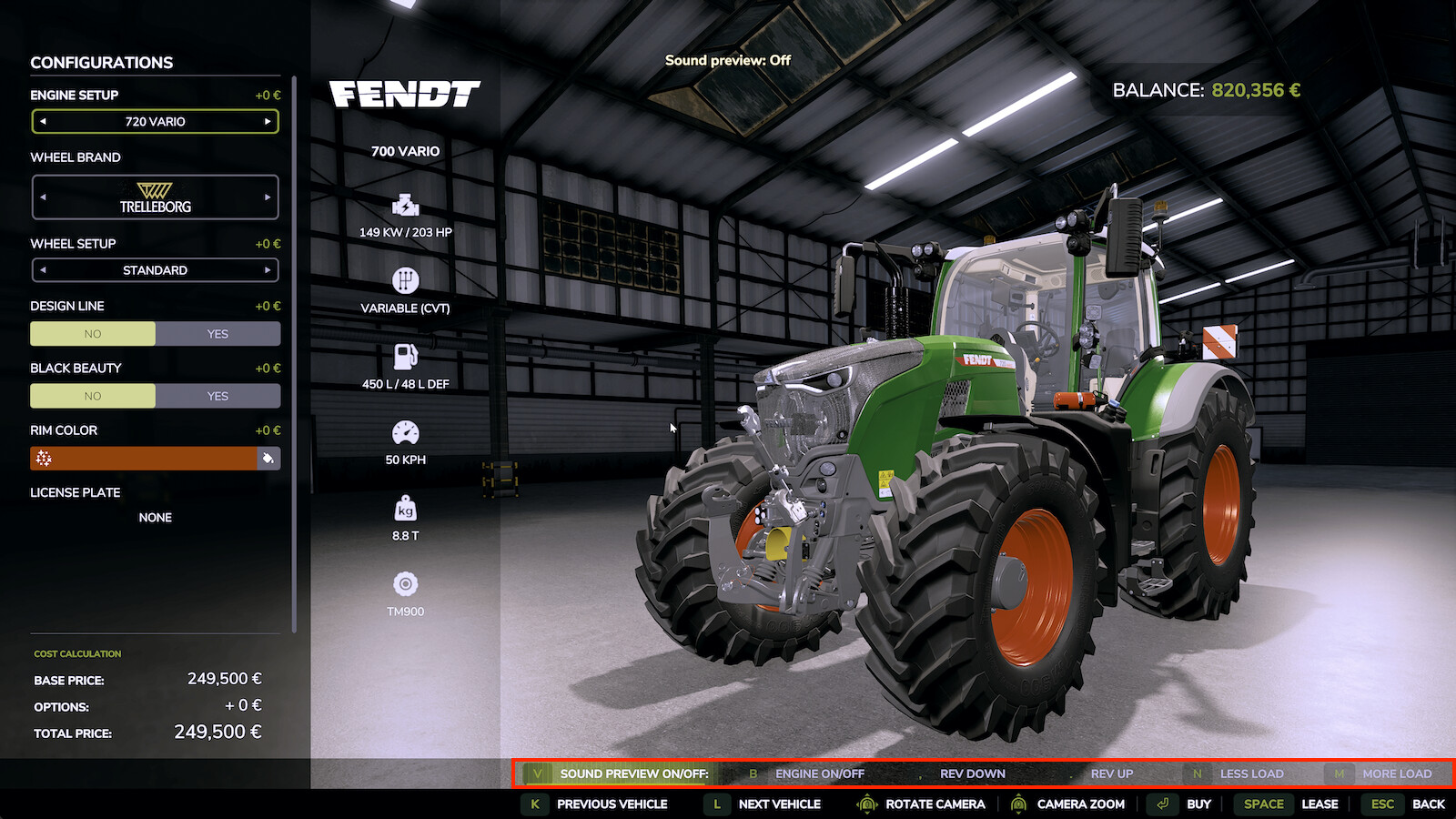
Always wanted to know how a tractor sounds before you buy it? Now you can. Select a vehicle and the engine starts on its own, or press [B] to switch it on and off. It is the vehicle's own engine sound from the game, not a generic sample. Don't want the automatic preview? Switch it off with [V] - Shop Sounds remembers your choice.
REV IT UP AND PUT IT UNDER LOAD
Idle sounds nice, but what does it sound like when it has to work? Rev from idle to full throttle with [,] and [.], add or take away engine load with [N] and [M]. Geared tractors even shift through the gears while you rev, just like on the field. CVT tractors stay smooth.
COMPARE ENGINE SOUNDS BACK TO BACK
Tired of going back to the list after every vehicle? Press [K] / [L] and jump straight to the previous or next vehicle without leaving the configuration screen - with the automatic preview on, the next engine is already running. Implements and trailers without an engine are included too, so you can browse the whole category.
WORK SOUNDS FOR HARVESTERS
Want to hear the threshing unit, not just the engine? Press [G] on harvesters and other machines with a work sound - the engine pulls up to working speed like in the field.
SIT IN THE CAB AND HEAR IT FROM INSIDE
Together with the Shop Vision mod you can take a seat in the cab right in the shop. Shop Sounds switches to the inside sound: the outside engine sound steps back and the vehicle's own cab sounds take over. Click the engine start IC point in the cab and the engine starts - Shop Sounds takes care of the whole sound.
WORKS WITH YOUR SOUND MODS
With More Motor Sounds installed, you hear every engine sound variant live in the shop as you click through it. With Tire Sound installed, press [T] to preview the tire sound - a simplified example, the real mod fine-tunes the sound to row-crop or dual tires while driving, which the shop cannot reproduce. Too loud or too quiet? [-] and [=] set the preview volume and it stays that way. And on the Fendt Katana with DashboardLive installed there is a little easter egg waiting for you.
No settings needed. Works in singleplayer and multiplayer.
Hotkeys (shop configuration screen):
[B] Engine on/off
[V] Automatic sound preview on/off
[,] [.] Rev down / up
[N] [M] Less / more load
[K] [L] Previous / next vehicle
[G] Machine work sound on/off
[T] Tire sound on/off (with Tire Sound)
[-] [=] Quieter / louder (German keyboard: [ß] [´])
All functions can also be clicked in the button bar at the bottom.
Changelog v1.1.0.0:
- Works together with the new Shop Vision mod: inside sound in the cab view, engine start via IC point in the cab, button bar adapts to the Shop Vision buttons and hides with the menu
- Engine sound layers now play at the same volume and pitch as in the game
- Fixed: the game could freeze for up to a minute when switching vehicles in the shop
- Fixed: a permanent humming drive sound on some harvesters (e.g. CLAAS Jaguar)
Mod details
Player screenshots
Sign in to add yoursNo screenshots yet. Be the first to share a shot from your game.
About Shop Sounds
Shop Sounds is an FS25 mod in the Scripts category, originally made by Alehandro. The current version is 1.1.0.0, last updated on November 23, 2026. Available for PC.
Browse more FS25 Scripts mods.